Manual
How TAKTKERN works, from the top of the device to the last pad.
Quick start: your first loop
On the first start TAKTKERN plays a demo beat, so you can listen and look around right away. For a loop of your own:
- New project: VIEW slider to PROJECT, the wheel to NEW PROJECT, then SET. Choose a name and a tempo.
- Drums step by step: VIEW slider to TRACK. Press SHIFT + PLAY (TRACK) and tap the first pad: track 1, the kick, is selected and PLAY lights again. Turn the wheel to a step and press SET to place a hit; SET again removes it. Steps 1, 5, 9 and 13 make a solid start.
- Let it run: START/STOP (▶, top left).
- Play along: while it runs, tap REC and play the snare or hi-hat pads in time. What you play lands in the loop. SHIFT + SET takes the last recording back.
- Change a sound: press SOUND, pick a category on the top pads, turn the wheel (the marked sound plays briefly) and press SET to load it onto the track.
- Shape it: PAGE slider to TONE. The four knobs change DJ FILTER, DECAY, SWING and REVERB of the track.
- Keep it: AUTOSAVE is on, nothing gets lost. VIEW › PROJECT › EXPORT WAV turns the loop into an audio file.
What the app is
A groovebox for iPhone and iPad that looks and works like a real device: 16 pads, 4 endless knobs, a master knob, a wheel, two sliders, a SHIFT lever and 8 function keys. It has 16 tracks, a step sequencer, drums, melodic sounds, chords, effects, sampling via microphone and import, vocal recording (VOCALS) and WAV export. Everything can be operated without touching the display; tapping the display is only a shortcut.
On the iPad, and with the iPhone turned sideways, the device rearranges itself for the wider screen: display and knobs on one side, function keys and pads on the other. Every part works the same in every layout.
No piano roll, no song timeline, no mixer window other than the pad view MIX/MASTER — this is intentional ("an instrument, not a DAW").
The device from top to bottom
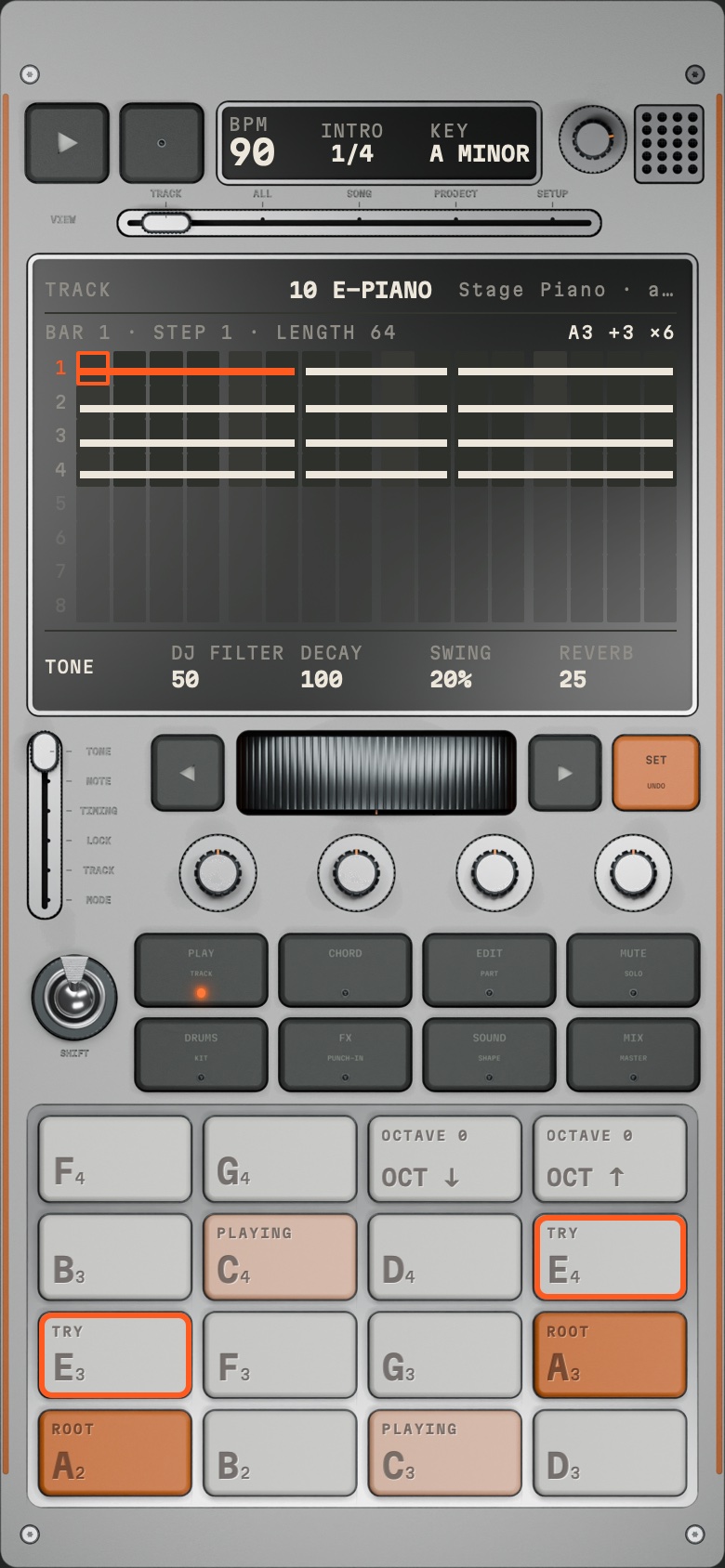
| Part | What it does |
|---|---|
| START/STOP (▶, top left) | Start/stop. Lit while running. |
| REC | Recording on/off (LED). See chapter 9. |
| Header display | BPM · PART n/N (a queued part shows as "n → m"; above the number, the part's name if it has one) · KEY. |
| Master knob (top right) | Overall volume, knob with end stops. Does not apply to the export. |
| Speaker grille | Looks only. |
| VIEW slider | 5 positions: TRACK · ALL · SONG · PROJECT · SETUP — sets what the main display shows. |
| Main display | Sequencer, lists, images, levels, messages. Top: function, track, sound; below that the context line. |
| PAGE slider (left) | 6 positions: TONE · NOTE · TIMING · LOCK · TRACK · MODE — sets what the 4 knobs do. Motor fader: moves by itself when the function changes. |
| ◀ wheel ▶ | Wheel: scroll, move the cursor, choose values. ◀ ▶: one step back/forward. |
| SET (second label UNDO) | Confirm, set a step, load. SHIFT + SET = UNDO. |
| 4 endless knobs | Values of the current knob page. Turn with a finger in a circle, 24 detents per turn; the display shows the value. |
| SHIFT lever | Switches to the second key layer. Lever up = off, down = on. Stays on until you tap SHIFT again. |
| 8 function keys | Set what the 16 pads do. Each has a second function (small print) via SHIFT. |
| 16 pads (4 × 4) | Play, select, switch — depending on the function key. |
The 8 function keys
| Key | Main function | With SHIFT |
|---|---|---|
| PLAY | Pads play the selected track | TRACK |
| CHORD | Chords of the key | — |
| EDIT | Copy, paste, parts | PART |
| MUTE | Mute tracks | SOLO |
| DRUMS | Play the kit | KIT |
| FX | Track effects | PUNCH-IN |
| SOUND | Load a sound | SHAPE |
| MIX | Levels of all tracks | MASTER |
Basic operating principles
- Exactly one function key is always lit. It sets what the pads do. The display shows the matching list or view.
- SHIFT switches layers: the active function jumps straight to its counterpart (e.g. SOUND → SHAPE). SHIFT stays on until you tap it again. Exception: in TRACK, a pad selects the track, jumps back to PLAY, and SHIFT turns off.
- Wheel + SET: the wheel selects, SET executes. In lists: the wheel marks, SET loads/opens.
- Knobs: the PAGE position sets their meaning. Functions with their own MODE page (CHORD, SHAPE, KIT, MIX, MASTER, PROJECT, SETUP) move the PAGE slider to MODE automatically; going back to PLAY etc. returns it to the page that was last open there. Moving it by hand always works. A finger on the slider holds it in place.
- Confirmations: deleting and replacing ask "PRESS SET AGAIN · … ?" — SET confirms, any other press or change cancels.
- Undo: SHIFT + SET, up to 50 steps. Exceptions: in name entry and in the KIT lists, SET has its normal meaning there.
- Messages appear briefly in the display (e.g. "DELETED", "ALL 16 USED").
- Haptics and UI sounds: every control gives a small pulse and a quiet mechanical sound (adjustable in SETUP). Pads that play a note do not click. UI sounds are never in a recording or export.
- After a restart the app opens where you left off (track, function, view, page, cursor, part). Open lists and confirmations are closed.
Tracks, parts, song
- 16 tracks. Each track has a sound, its own length (up to 8 bars), its own knobs, effects and mute.
- Track type follows the sound: DRUMS and FX sounds = drum track, all others = melodic track, VOCALS = vocal track. The track name is the sound's folder (KICK, E-PIANO …) or the name of a user sound; without a sound "— EMPTY".
- Tracks 1–8 are the kit (like the kit tracks of the TR-8S). Tracks 9–16 are free.
- Parts: a project has 1–16 parts. Each part is independent: notes, track lengths, mutes and, per track, sound (instrument), sound knobs (DJ FILTER, DECAY, REVERB), SHAPE, track effects, level, pan and echo. If you change these in part 3, the other parts stay as they are; so the same track can play a keyboard in the verse and a synth in the chorus. Tempo, key, time signature and MASTER apply to the whole song (each part has its own SWING and track tempo); SOLO applies everywhere. A part is as long as its longest track. Parts can have a name (up to 12 characters).
- CHAIN on: START/STOP plays all parts in order from the selected part, then part 1 again. CHAIN off: the selected part loops.
- Time signature: 4/4, 3/4, 6/8 (PROJECT, MODE). One bar = 16 or 12 steps.
- Key: one for the whole project (PROJECT › KEY). Notes are stored as absolute pitches; changing the key does not change existing notes.
Views (VIEW slider)
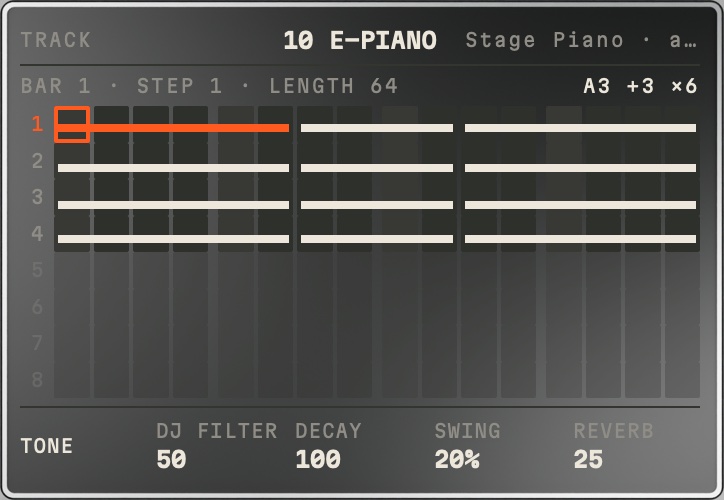
- TRACK: the step sequencer of the selected track. One row = one bar (up to 8 rows); rows beyond the track length are dimmed. Cursor = orange frame. Context line: BAR · STEP · LENGTH. Marks in the grid: lines for notes (short line = mini note), slant = glide, orange dot = lock, ticks = ratchet, offset = micro timing. In KIT the display shows the slot's waveform, in SHAPE an image of the section.
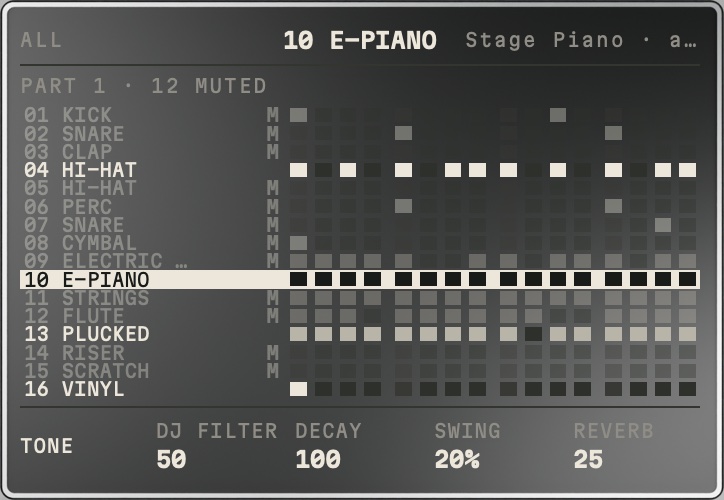
- ALL: all 16 tracks in the current bar. The wheel selects a track, SET opens it in TRACK. Shows how many tracks are muted/soloed.
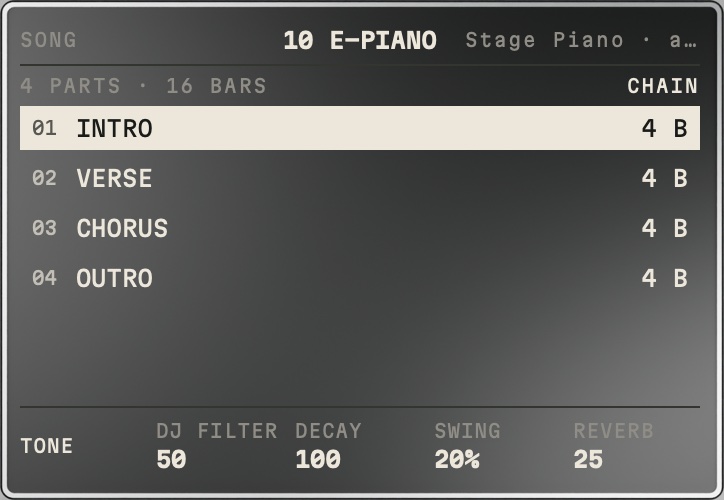
- SONG: list of the parts (with names) and their bars, the playing part with progress. The wheel selects, SET jumps there (while playing: at the end of the bar).
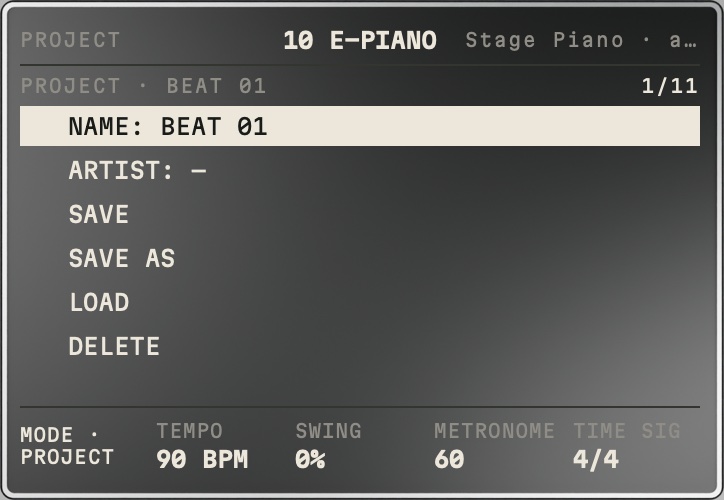
- PROJECT: list NAME · ARTIST · SAVE · SAVE AS · LOAD · DELETE · NEW PROJECT · EXPORT WAV · EXPORT STEMS · TAP TEMPO · KEY. Knobs (MODE): TEMPO · SWING (sets all tracks) · METRONOME (volume) · TIME SIG. See chapter 16.
- SETUP: device settings, HELP and INFO. See chapter 17.
Knob pages (PAGE slider)
| Page | Knob 1 | Knob 2 | Knob 3 | Knob 4 | applies to |
|---|---|---|---|---|---|
| TONE | DJ FILTER | DECAY | SWING | REVERB | the whole track |
| NOTE | LENGTH | GLIDE | VELO | OCTAVE | note under the cursor |
| TIMING | RATCHET (1–4×) | MICRO (±50 % of a step) | CONDITION (ALWAYS · EVERY 2ND · EVERY 4TH) | CHANCE (%) | note under the cursor |
| LOCK | DJ FILTER | DECAY | REVERB | PITCH | only the step under the cursor |
| TRACK | LENGTH (steps, up to 8 bars) | SPEED (½× · 1× · 2×) | LEVEL | — | the track |
| MODE | depends on the function (chord, SHAPE, MIX, effect values …) |
- TONE vs. LOCK: same knobs, different scope. TONE = base value for the whole track. LOCK = exception for just one step (Elektron "parameter lock"), e.g. only the fourth snare with lots of reverb. "—" in LOCK = step follows the track; turning fully left = remove the lock. Locked steps have an orange dot.
- Automation (recording locks): REC on, then turn knobs on TONE, TRACK, MIX, TRACK FX or SHAPE. While playing, the value lands on the step the selected track is playing right now; when stopped, on the step under the cursor. The page is then called "LOCK 5 · …", the knobs show that step's values, the base value stays. Lockable are DJ FILTER, DECAY, REVERB, LEVEL, the amounts of the track effects and every numeric SHAPE value (not: TYPE, TARGET, WAVE, MONO/POLY, UNISON, CHOKE, loop MODE, REVERSE, TUNE); at most 12 of them per step. An empty step only gets the value (dot without a note) and changes the note that is currently sounding — this is how a long pad gets louder or dirtier. Effect amounts hold until the next lock arrives. LOCK shows "+3 LOCKS" when the cursor step carries more locks. Deleting: SHIFT + SET undoes the whole recording.
- DJ FILTER: quick filter (center = open, left darker, right brighter). The SHAPE filter sits before it.
- DECAY is the same value as SHAPE › ENVELOPE › DECAY.
- LENGTH (NOTE): melodic: 1/8 STP · 1/4 STP · 1/2 STP (mini notes), then 1–32 steps. Drums: FULL (the hit rings out), then 1/8 · 1/4 · 1/2 STP, then shortened in steps. Lengthening a note stops at the next note.
- PITCH and OCTAVE on melodic tracks change the note itself: PITCH moves it one semitone per detent, OCTAVE by 12. C becomes D, displayed and stored as if it had been entered that way; the knob shows the note name; chords move with all their notes; at C1/C8 the note stays put. On drum tracks (including FX and user samples) OCTAVE moves the hit by whole octaves (±2); PITCH stays a lock for that step there (±12, orange dot) and adds to it.
- REC page: appears when you switch REC on while stopped (chapter 9).
- On a vocal track NOTE, LOCK and TIMING show "—"; TONE only works with DJ FILTER and REVERB.
The function keys and their pads
PLAY (pads play the selected track)
- Melodic track: 14 notes = two octaves of the key. Top right OCT ↓ / OCT ↑ (−2 … +2, remembered per track). Coach light: ROOT = root note brightest, PLAYING = notes currently sounding on other tracks, TRY = notes coming on other tracks in the next bar.
- Kit track (1–8): 16 pads: rows 1–2 = kit tracks 1–8, rows 3–4 = hits on tracks 9–16 (melodic and empty tracks dark).
- Drum track 9–16: 16 velocities of the same hit (MPC "16 Levels").
- Vocal track: pads 1–8 = takes, row 3 = DELETE TAKE (chapter 15).
- Stopped: a pad writes the note to the step under the cursor, the cursor moves on. Hold a pad + more pads = chord in the step; hold a pad + wheel = longer note. On the 16 kit pads only the pad of the already selected track writes; the pad of another track only switches to it (sounds, sets nothing).
- Playing: pads only play; with REC they record.
TRACK (SHIFT + PLAY)
16 pads = 16 tracks; a tap selects the track and jumps back to PLAY (SHIFT turns off). Lit pads = track is playing.
CHORD
- Rows 1–2: the 7 chords of the key (name on the pad), on the right ARP (tap: ARP OFF → ARP ↑ → ARP ↓ → ARP ↑↓).
- Row 3: 4 popular chords outside the key (label BORROWED). MINOR and PENTA: V major, IV major, ♭II, I major (in A minor E, D, A#, A); MAJOR: iv, ♭VII, ♭VI, II (in C major Fm, A#, G#, D); DORIAN: like MINOR, but ♭VI instead of IV. Written with sharps like the root notes: A# = B♭, G# = A♭.
- Row 4: ADVANCE ¼ BAR · ½ BAR · 1 BAR · 2 BARS — how far the cursor jumps after a chord.
- Suggestions: after the chord before the cursor, the chords that usually follow light up: bright with label TRY = common, with a frame = also fits. At the start of a track the root chord lights up.
- Stopped, a chord writes real notes to the cursor step. It sounds until the next chord (or until the next note or the end of the track). If you set a chord in the middle of another one, the earlier one ends there; a chord before it that ends earlier extends to the new one. If the cursor is past the end of the track, the track gets longer by the ADVANCE (at most 8 bars). Example for four chords in one bar: ADVANCE ¼ BAR, cursor on step 1, tap F, tap G, cursor on step 6, tap Dm, cursor on step 9, tap C → F 4 steps, G 1, Dm 3, C 8.
- Playing, a chord only plays; with REC it is recorded (as long as it was held).
- MODE: TYPE (TRIAD = three notes · 7TH = with the seventh · 9TH = plus the ninth) · INVERSION · RANGE (LOW · MID · HIGH) · ARP RATE (1/8 · 1/16 · 1/32) — apply to the chord under the cursor and the following ones. The ARP pad and ARP RATE show the value of the chord under the cursor.
- Monophonic track: only the root note. Drum and vocal track: "—". ARP plays the notes of the step one after another.
KEY (PROJECT › KEY)
In the PROJECT view the last row "KEY: A MINOR", SET: the pads show 12 root notes + 4 scales (MINOR · MAJOR · DORIAN · PENTA), until you press a function key. Applies to PLAY pads, CHORD, coach light and TUNE/HARMONY. SHIFT + CHORD has no function.
EDIT
- Row 1: COPY PART · PASTE PART · NAME PART · DELETE PART (asks first; the last part stays)
- Row 2: COPY TRACK · PASTE TRACK · CLEAR TRACK · PASTE + SOUND
- Row 3: COPY BAR · PASTE BAR · CLEAR BAR · DOUBLE BAR
- Row 4: NUDGE ← · NUDGE → · NEW PART · CHAIN on/off
- COPY PART stores the whole current part (notes, lengths, mutes, takes, sounds, knobs, effects, mix). PASTE PART overwrites the current part with it; the copy is independent afterwards, the name stays. To make part 3 like part 1: select part 1, COPY PART, select part 3, PASTE PART. Pasted into another project, the part arrives without takes: recordings belong to the project they were made in.
- NEW PART creates an empty part after the current one, with its sounds and settings, and selects it.
- NAME PART opens name entry (wheel = letter, ◀ ▶ = position, DONE). Empty = back to "PART n".
- PASTE TRACK takes over notes, length, track tempo, track effects, level, pan and echo of the copied track; sound, SHAPE and sound knobs of the target track stay. PASTE + SOUND pastes the same plus the instrument, SHAPE (including sample start, length etc.) and sound knobs — a complete copy of the track.
- Acts on the selected track in the selected part, or on the bar under the cursor. With 16 parts: "ALL 16 USED".
- Undo: SHIFT + SET.
PART (SHIFT + EDIT)
Pads = parts (bright = exists, orange = playing, dark = empty); a named part shows its name in large type. Tap when stopped = immediately, when playing = at the end of the bar. Because SHIFT is on, SET means UNDO here; to jump in the SONG view, turn SHIFT off first.
MUTE / SOLO (SHIFT + MUTE)
MUTE: a pad mutes the track in the current part. SOLO: hear only these tracks, applies in the whole song.
DRUMS
Rows 1–2 = kit tracks 1–8, rows 3–4 = drum sounds on tracks 9–16 (dark = melodic or empty). Play live; record with REC.
KIT (SHIFT + DRUMS)
- Rows 1–2: select slot = track 1–8.
- Rows 3–4: PICK SAMPLE · PREVIEW · SAVE KIT · LOAD KIT · COPY SLOT · PASTE SLOT · CLEAR SLOT.
- PICK SAMPLE shows all kit pieces by folder and genre, like SOUND › DRUMS (only the last chosen genre open, chapter 10).
- User kits apply across the whole device; in the kit list SET loads, RENAME and DELETE (with confirmation) are pads.
- SAVE KIT includes all SHAPE values of the 8 drum tracks. Shaping a slot: SHIFT + SOUND (SHAPE).
FX = TRACK FX (effects of the selected track)
Pads show only effects that suit the sound (list in chapter 12). Tap = add/remove, at most 3 per track. MODE: knobs 1–3 = amount of effect 1–3; on tracks 1–8 knob 4 = GLUE (glues the drums together, acts on all kit tracks). The chain is shown in the display. Vocal effects: see chapter 15.
PUNCH-IN (SHIFT + FX)
16 performance effects on the whole mix: hold = on while your finger stays down; double-tap = latch, double-tap again = release. List in chapter 12.
SOUND (load a sound)
Top 8 categories, bottom up to 7 folders + PREVIEW (bottom right). List in the display, the wheel marks (the marked sound plays briefly as soon as the wheel stops), SET loads it onto the track. More than 7 folders: the seventh pad pages on with each tap. List of sounds in chapter 10.
SHAPE (SHIFT + SOUND)
Shape the track's sound — chapter 11.
MIX
Pads = 16 tracks (tap selects). MODE: LEVEL · PAN · REVERB · ECHO of the selected track. Display: 16 bars with real level; a line shows where LEVEL is set; the peak holds briefly.
MASTER (SHIFT + MIX)
Bus effects (chapter 12), tap = on/off, at most 4 at once, knobs 1–4 = amount. Row 4: REVERB and ECHO — tapping shows their knobs (tap again = back to the amounts). Display top: bus level L/R, "LIMIT −x DB" when the protection limiter kicks in, "TOO LOUD" from 6 dB. MASTER applies in the WAV export, not in the stems.
Setting and editing steps
- TRACK view, stopped: the wheel or ◀ ▶ moves the cursor, SET sets/deletes the step (melodic track: sets the note A2, drum track: the hit; the set note sounds once). The right note is better entered with a pad: in PLAY tapping a pad writes that note at the cursor. Tapping a cell in the display also works.
- A step can hold up to 8 notes (chord). NOTE values apply to the whole step.
- Mini notes: NOTE › LENGTH below 1 STP → 1/2, 1/4, 1/8 STP. Can be combined with MICRO, RATCHET (the mini length then applies to each hit) and GLIDE (a glide note directly after a mini note does not glide, the mini note is already over).
- Glide/slide: NOTE › GLIDE (0–10) glides in from the previous note; shown as a slant in the grid. Live on a monophonic track: hold one pad and tap a second → the note glides over briefly (about 60 ms); with REC the note is stored with GLIDE 5. Monophonic/polyphonic: SHAPE › VOICE › MONO/POLY (bass/lead monophonic by default). For a clear 808 slide: track MONO, NOTE › GLIDE high.
- Ratchet: splits a step into 1–4 fast hits. Micro: shifts by ±50 % of a step. Condition: ALWAYS, EVERY 2ND, EVERY 4TH (counted from the start of the part). Chance: probability (the same on every playback and in the export).
- Locks: see LOCK in chapter 6.
- Copying/nudging: EDIT (chapter 7).
Recording (REC)
- Tap REC = recording on/off (LED, switches on press). While playing, pads write at the playback position; stopped, they write to the cursor; playing without REC, they only play.
- Switch REC on while stopped → the knobs immediately show the REC page: QUANTIZE (how strongly imprecise hits are pulled onto the step) · MODE (OVERDUB = existing notes stay / REPLACE) · COUNT-IN (OFF, 1, 2 bars) · REC LENGTH (1, 2, 4, 8 bars or one TRACK pass, after which REC turns itself off). START/STOP, the PAGE slider, REC off or a change of function/view return to the previous page.
- Count-in: REC on while stopped, START/STOP → count-in → recording. The metronome only clicks while recording and during the count-in (volume: PROJECT › METRONOME, sound: SETUP › CLICK SOUND).
- Length of a played-in note = how long the pad was held, at least 1 step. Pads pressed together = chord.
- CAPTURE (SHIFT + REC): brings into the track, after the fact, what you played without REC during the last REC LENGTH bars. On SHAPE (itself already SHIFT + SOUND), REC always switches recording.
- Undoing a recording: SHIFT + SET.
Sounds (SOUND)
Categories (top pads): DRUMS · BASS · KEYS · SYNTH · PADS · LEADS · FX · SAMPLE
| Category | Folders (bottom pads) |
|---|---|
| DRUMS | KICK · SNARE · CLAP · HI-HAT · CYMBAL · TOM · PERC (+ USER); in the list grouped by genre (only the last chosen one open): ANALOG 808/909 (Analog 808, Analog 909) · HIP-HOP/TRAP · LO-FI (with the kits Boom-Bap and Lo-Fi Dust) · HOUSE/TECHNO (with Amapiano) · ELECTRO · HARD (with Hardstyle and Hardtekk) · ACOUSTIC |
| BASS | SYNTH BASS · 808 (13 long 808s, root note measured, play notes) · ELECTRIC BASS · UPRIGHT BASS |
| KEYS | GRAND PIANO · E-PIANO (FM e-piano, stage piano, reed piano) · ORGAN · MALLETS · PLUCKED |
| SYNTH | PLUCK · STAB · CLAVI |
| PADS | SYNTH PAD · CHOIR · STRINGS · SOLO STRINGS |
| LEADS | SYNTH LEAD · SAX · FLUTE · WOODWIND · BRASS |
| FX | RISER · IMPACT · SWEEP · SIREN · LASER · GLITCH · VINYL · SCRATCH (scratches, rewinds, record stop) |
| SAMPLE | your samples and the actions (chapter 14) |
- Drum genres collapsed: in DRUMS only the genre you last chose a drum sound from is expanded ("−" before the name); the others each appear as one row with "+" (SET OPENS). SET on a "+" row expands it and collapses the other, SET on the open one collapses everything. A new project starts with ANALOG 808/909 (the starting kit); the open genre is saved with the project.
- Preview: when the wheel stops on an entry, it plays briefly (also in KIT › PICK SAMPLE). The PREVIEW pad plays the marked entry. Genre rows do not sound.
- User sounds: SHAPE › SAVE stores a shaped sound in its category in the subfolder USER (message e.g. "BASS · USER").
- Changing the sound changes the track name and track type immediately; notes stay.
SHAPE (SHIFT + SOUND)
Shapes the sound of the selected track, drums as well as melodic. Pads rows 1–3 = sections (a tap puts their 4 values on MODE, the display shows an image), plus INIT (asks first) and SAVE (name via the wheel). Row 4 auditions: melodic = root, third, fifth, octave of the key; drum = 4 velocities.
| Section | Knobs |
|---|---|
| SAMPLE | START · LENGTH · TUNE (±24 semitones, whole track) · REVERSE |
| ENVELOPE | ATTACK · DECAY · SUSTAIN · RELEASE |
| FILTER | TYPE · CUTOFF · RESONANCE · ENV AMT |
| LFO | TARGET (pitch/filter/level) · RATE · DEPTH · WAVE |
| DIRT | DRIVE (rounded clipping) · BITCRUSH (stair steps) |
| VOICE | MONO/POLY (melodic only) · GLIDE (monophonic only) · UNISON · CHOKE (drums only: hits of the same group cut each other off, e.g. hi-hat closed/open) |
| GRANULAR | POSITION · SIZE (grain 10–250 ms) · DENSITY (0 = off) · SPREAD |
| PITCH (envelope) | START (±24 semitones at the attack) · TIME · CURVE — for kicks, 808 glides, toms, zaps |
| LOOP | MODE (AUTO = like the instrument · ON · OFF) · START · LENGTH · X-FADE |
| RANDOM | PITCH · LEVEL · START · FILTER — deviation per hit, the same on every playback and in the export |
- REVERSE trims the inaudible tail so the sound starts immediately when reversed.
- Hi-hats tuned up sound rough/metallic from about TUNE +10 (known, kept as character).
- A vocal track has no SHAPE ("VOCALS · NO SHAPE").
Effects
TRACK FX (FX) — appear only for suitable sounds, at most 3 per track, amount via MODE
| For | Effects |
|---|---|
| Kick | FATTER KICK · PUNCHIER KICK · TAPE |
| Snare/clap | ROOMY SNARE · SNAPPIER SNARE · PHONE · REVERSE REVERB (clap also PERC ECHO) |
| Hi-hat | AIRY HATS · DUSTY HATS · JET |
| Perc | PERC ECHO · DUSTY HATS · JET · WANDER · REVERSE REVERB |
| all drums | TIGHTER & DRIER · GLUE DRUMS · VINYL FEEL · DIRTIER · OFF THE RECORD |
| FX sounds | BIGGER TRANSITION · DIRTIER · OFF THE RECORD |
| Bass | TIGHTER BASS · SOFTER · MORE SPACE · UPFRONT · PUMP · TAPE · VINYL FEEL · DIRTIER · OFF THE RECORD |
| Instruments/keys | SOFTER · MORE SPACE · UPFRONT · PUMP · FLOAT · CHOPPED · WANDER · PHONE · TAPE · VINYL FEEL · DIRTIER · OFF THE RECORD |
| Pads | WIDER · SOFTER · MORE SPACE · UPFRONT · PUMP · FLOAT · JET · CHOPPED · WANDER · PHONE · TAPE · VINYL FEEL · DIRTIER · OFF THE RECORD |
| Vocals | PRESENCE · DE-ESS · PHONE · RADIO · DOUBLE · ECHO THROW · REVERB · TUNE · HARMONY · VOCODER |
Explanations: FLOAT = phaser · JET = flanger · CHOPPED = switches on/off in sixteenths · WANDER = moves left/right in time · PHONE = thin, like through a phone receiver · REVERSE REVERB = reverb swells up before the hit · TAPE = tape saturation · PUMP = sidechain: the track ducks on every kick hit (without a kick, on every quarter); only the strength is adjustable. Anything that moves in time follows the tempo.
PUNCH-IN (SHIFT + FX) — whole mix, hold = on, double-tap = latch
STUTTER 1/8 · STUTTER 1/16 · TAPE STOP · REVERSE · LOW FILTER · HIGH FILTER · LO-FI · VINYL · REVERB THROW · ECHO THROW · GRANULAR · PITCH ↓ · PITCH ↑ · GATE · DISTORT · PUMP
MASTER (SHIFT + MIX) — bus, at most 4 at once
GLUE · WARMER · BRIGHTER · VINYL · WIDER (stereo width, bass stays centered) · LOUDER · BASS MONO (below ~120 Hz to the center) · TAPE · AIR (sheen in the highs) · MAXIMIZER (makes the whole song up to 8 dB louder, peaks stay clean below −1 dBFS; MODE amount = how much louder; use it as the last effect) — plus REVERB (SIZE · DAMPING · PRE-DELAY · LEVEL) and ECHO (TIME 1/16 · 1/8 · 1/8 DOT. · 1/4 · 1/4 DOT., always in tempo · FEEDBACK · FILTER · PING-PONG). Reverb and echo are the shared rooms; each track sends to them via TONE/MIX › REVERB or MIX › ECHO. A protection limiter sits at the end.
Volume and levels
- Track level: TRACK › LEVEL or MIX › LEVEL (the same value). Pan: MIX › PAN.
- Master knob top right = monitoring volume, not in the export.
- Seeing levels: MIX (per track), MASTER (bus, LIMIT, TOO LOUD).
Sampling (SOUND › SAMPLE)
Bottom pads: RECORD · IMPORT · RESAMPLE · TYPE · NAME · DELETE · VOCALS · PREVIEW. The wheel scrolls through your samples, SET loads the marked one onto the selected track. Samples also appear in KIT › PICK SAMPLE.
- RECORD: the display shows READY, input level and which mic is recording (AIRPODS · IPHONE · WIRED). Recording starts by itself as soon as you are louder than the threshold (knob 1). End: RECORD again or SET, after 30 s by itself; changing function or app discards it. Afterwards silence at start/end is removed, normalized, name via the wheel ("REC 01"), the sample is on the track immediately (SHIFT + SET undoes that).
- Mic: AirPods in full quality if they support it; otherwise the iPhone mic (AirPods keep playing in full quality); a wired headset takes priority. For vocals it is best to record with headphones: if the beat plays through the speaker, it gets into the mic and disturbs TUNE and HARMONY. Sound never comes from the earpiece. While recording you do not hear yourself, the beat keeps playing but does not go into the recording. Without headphones the mic can pick up the beat from the speaker. First recording: iOS asks for the mic; denied → "MIC OFF · SETTINGS".
- IMPORT: Files app, WAV · AIFF · MP3 · M4A · FLAC, at most 30 s (longer is cut off). Lands in SAMPLE, not automatically on a track.
- RESAMPLE: records one pass of the current part as it sounds (like the export), as a sample in SAMPLE.
- TYPE: suggests MELODIC (with recognizable pitch, root note detected) or ONE-SHOT; TYPE switches, knob 1 = ROOT. Type and root note apply across the whole device. The track type follows the type.
- NAME renames (projects remember the sample by ID, renaming does not change any sound). DELETE asks first and says how many projects/kits use it. If a sample is missing, the track stays silent and the display shows "SAMPLE MISSING".
- Slicing does not exist (yet).
VOCALS — recording your voice over the beat
- Creating: select a track → SOUND › SAMPLE › VOCALS. The track becomes a vocal track and is immediately 8 bars long (only in the current part). Another sound via SOUND makes it normal again; takes stay saved.
- Recording: REC on (the REC page appears), START/STOP → count-in (at least 1 bar) → the beat plays, you rap/sing → after one pass of the track REC turns off by itself, the beat keeps playing. If everything is already running, the recording starts at the next start of the track. Display: "TAKE n · WAITING FOR START", then "TAKE n · RECORDING 12.3 S", on the right the mic or "NO HEADPHONES".
- The new take can be heard right afterwards (in the first pass it comes in a moment after the start of the track).
- Takes: at most 8 per part. In PLAY: pads 1–8 = takes (bright = present, orange = playing, dark = empty), tap = from now on this take (at the same position). DELETE TAKE (row 3) → "PRESS SET AGAIN · DELETE TAKE?" → SET deletes permanently. All 8 used → "8 TAKES · DELETE FIRST". SHIFT + SET directly after a recording removes the new take.
- Length: a take is as long as the track (at most 8 bars) and loops with it. 16 bars = two parts in the CHAIN (part 1 and part 2 each with its own take). Anything past the end of the part is cut off.
- Cancelling: stop, REC, a change of function, part or app discards the recording in progress.
- Latency: the app compensates for the delay of mic and headphones. Fine adjustment: SETUP › LATENCY AIRPODS / IPHONE / WIRED in 5 ms steps (−150 … +150; positive = the take moves earlier). Test: clap along to the metronome, the peaks of the waveform should land on steps 1, 5, 9, 13.
- Tempo changed after recording: the take is not stretched and runs against the beat.
- Takes are never pushed out by other notes (16 voices of their own for takes).
- Vocal effects in TRACK FX (alongside PRESENCE, DE-ESS, PHONE, RADIO, DOUBLE, ECHO THROW, REVERB):
- TUNE (pitch correction): pulls everything that has a pitch onto the notes of the KEY — including short notes, transitions and rapped parts; sibilants, breaths and noise stay as they are. SPEED (left = soft and natural, fully right = every note jumps hard, the autotune effect; 90 % by default) · AMOUNT.
- HARMONY: a second voice, sung by two "singers" left and right of your voice, slightly offset and slightly detuned; your voice stays in the center and on the beat. It always sits cleanly in the key, even when you sing slightly off, and keeps your vibrato; with TUNE it follows the corrected voice. INTERVAL (3RD · 5TH · 3 + 5 · OCT. ↓) · AMOUNT · SOURCE (where the notes come from: KEY = notes of the key; a melodic track = notes of the chord it is currently playing: 3RD = the next chord note at least a minor third above you, 5TH = the one after that; if the track plays nothing, the key applies; the track provides notes even when muted). Context line e.g. "3RD · CHORD 10".
- VOCODER: your voice sings the notes of a melodic track as a synth. SOURCE (which track the notes come from; it provides notes even when muted) · TONE · DRY (how much of the original voice is added) · AMOUNT. If the track plays nothing, it is silent.
- Operation "select first, then switch": tap while off = on + its knobs appear; tap while on, knobs not visible = knobs appear; tap while on, knobs visible = off. A change of track, function, view or PAGE closes the knobs, the effect stays on.
- The effects do not shift syllables in time; the export sounds like playback; takes stay unchanged.
- When the track becomes normal again, TUNE, HARMONY and VOCODER are dropped.
Project (VIEW › PROJECT)
- NAME: rename. Name entry everywhere: wheel = character, ◀ ▶ = position, SET = confirm character and move on, pad DONE finishes; pads SPACE and DELETE; below, a character strip (space, A–Z, 0–9, -).
- ARTIST: written, together with the project name as title, into every exported WAV file (stems: "Name · 01 KICK"). Per project, NEW PROJECT takes it over; empty = no artist in the file.
- SAVE: same name → confirmation "PRESS SET AGAIN · REPLACE NAME?". AUTOSAVE (SETUP, on by default).
- SAVE AS: copy under a new name (vocal takes come along, random sounds the same); afterwards you work in the copy, the original stays as it was a moment ago. Its own name is not allowed; another existing one only after "PRESS DONE AGAIN · REPLACE …?".
- LOAD: list, wheel + SET. NEW/LOAD reset the octave to 0.
- DELETE: the same project list as LOAD; SET asks "PRESS SET AGAIN · DELETE NAME?", the second SET deletes (with its takes; user samples and kits stay). The loaded project is protected ("LOAD ANOTHER FIRST"). No undo.
- NEW PROJECT: asks for name and tempo; factory state (starting sounds, effects off, knobs at their defaults).
- EXPORT WAV (bus with MASTER) / EXPORT STEMS (each track separately, without MASTER): always plays all parts once in order, regardless of CHAIN. "RENDERING …", then: SAVE TO FILES · SHARE · DONE (wheel + SET). The file is in the Files app under "On My iPhone" (or "On My iPad") in the app's folder. UI sounds are never in the export.
- TAP TEMPO: mark it and tap SET in time; the interval between two taps (0.2–1.5 s) sets the tempo.
- KEY: SET shows the key pads (chapter 7, KEY).
- MODE: TEMPO · SWING · METRONOME · TIME SIG.
SETUP (VIEW › SETUP)
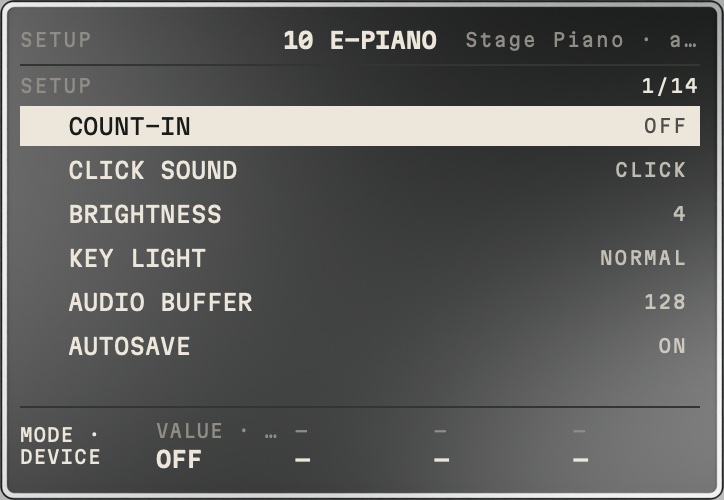
The wheel selects, values via knob/SET: COUNT-IN (OFF, 1 BAR, 2 BARS) · CLICK SOUND (CLICK, WOOD, BEEP) · BRIGHTNESS (1–5) · KEY LIGHT (OFF, NORMAL, BRIGHT) · AUDIO BUFFER (64, 128, 256, 512 — also shows the actual value) · AUTOSAVE (OFF, ON) · UI SOUNDS (LOW, MID, HIGH, OFF; the master knob does not change them) · FACTORY RESET · HELP (topics per function, starts at the topic of the function currently in use; the wheel selects, SET goes back) · INFO (credits; the last line SOFTWARE LICENSES lists the libraries inside the app with their license, SET shows the full license text, the wheel scrolls, SET goes back) · LATENCY AIRPODS · LATENCY IPHONE · LATENCY WIRED.
Quick reference: combinations and gestures
| What | How |
|---|---|
| Second function of a key | SHIFT, then the key (SHIFT stays on until the next SHIFT) |
| Undo | SHIFT + SET |
| Capture (grab what you played afterwards) | SHIFT + REC |
| REC settings | REC on while stopped → REC page |
| Chord in a step | stopped, in PLAY: hold a pad + more pads |
| Several chords in one bar | CHORD, ADVANCE ¼ or ½ BAR, tap chords (each sounds until the next) |
| Choose the key | VIEW PROJECT › KEY, SET |
| Expand a drum genre | in the drum list on the "+" row, SET |
| Lengthen a note | stopped, in PLAY: hold a pad + wheel, or NOTE › LENGTH |
| Glide live | monophonic track: hold a pad + a second pad |
| Punch-in | hold = on; double-tap = latch/release |
| Vocal effect knobs | tap the effect pad (select first, then switch) |
| Hold the motor fader | finger on the PAGE slider |
| Back to the start | after stopping press START/STOP again ("BACK TO START"), then START/STOP plays from the top |
| Page through SOUND folders | tap the seventh folder pad repeatedly |
| Confirm / cancel a confirmation | SET / any other press |
| Select a track | SHIFT + PLAY (TRACK), tap a pad; or ALL + wheel + SET |
Limits and known quirks
- 16 tracks, 16 parts, at most 8 bars per track, 8 notes per step, 3 effects per track, 4 master effects.
- 64 voices for notes (+16 for takes). If very many chords play at once, the oldest notes drop out.
- Samples at most 30 s. No slicing. No monitoring while recording, no stretching of takes on tempo changes.
- No song timeline, no piano roll; the song is built from parts and CHAIN.
- Live glide is short (about 60 ms); audible gliding via NOTE › GLIDE.
- TUNE with fast-gliding vocals: the steps sit slightly (15–20 cents) too high there; held notes are accurate.
Short glossary
- Step: a sixteenth (in 6/8 an eighth-note grid with 12 steps per bar). STP = step.
- Part: a section of the song (like a pattern) with its own sounds, effects and mix. CHAIN: play parts in order.
- Lock: a value for just one step. Ratchet: fast repetition within the step. Micro: fine shift within the step.
- Monophonic/MONO: always plays only one note (bass, lead). Choke: one hit cuts off the other.
- Take: a vocal recording on a vocal track. Resample: record your own beat as a sample.
- Capture: record after the fact what you just played without REC.
- Coach light: lit pads in PLAY that show suitable notes.
- ADVANCE: how far the cursor jumps after a chord is set.
- Borrowed chord: a chord from outside the key (e.g. E major in A minor) that is common in pop and hip-hop.